
Editable Assets
Edit existing assets easily. Editable Assets lets you open, update, and save content while keeping everything organized in its original location, so you can refine your work without creating clutter.
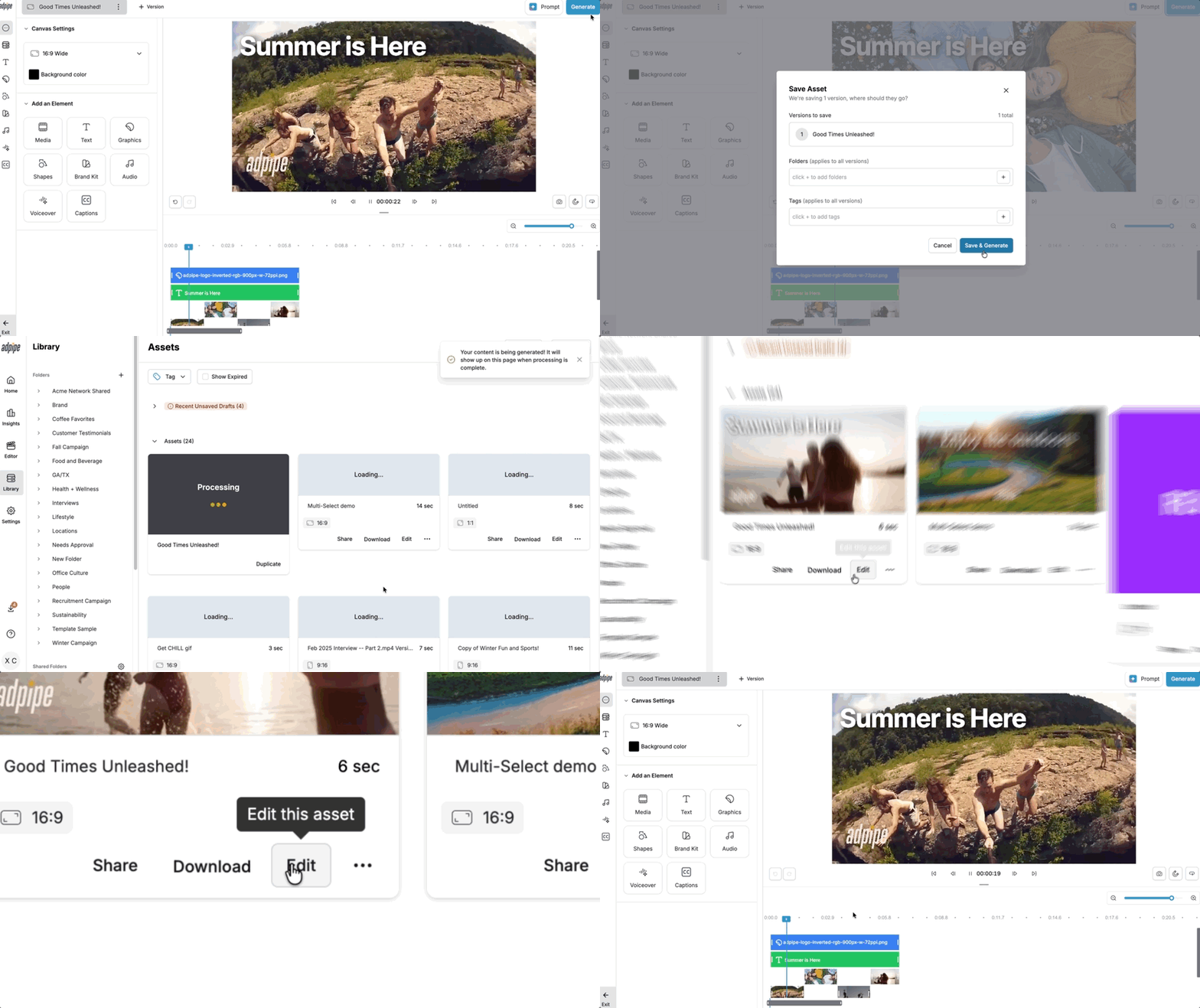
How to Edit an Asset
- Find the asset you want to update in your AdPipe library
- Select the asset and click Edit
- The asset opens in the editor with all current content intact
- Make your changes (text, graphics, timing, layout, etc.)
- Click Generate to save and update the asset
What You Can Do
- Save time with a direct edit, no need to start from scratch
- Refine campaigns on the fly as feedback comes in
- Keep your library clean by eliminating unnecessary duplicate versions
- Update an asset and have it reflected everywhere it's been shared
FAQs
If I edit an asset will it change my organization?
No, all folders and tags are preserved when editing assets.
Can I still duplicate an asset instead of editing it?
Yes. The duplicate feature is still available whenever you want to keep the original untouched. Just navigate to the ••• menu on the asset card and select Duplicate.
What if I make a change I don't like?
You can use Undo/Redo while in the editor to step back through your changes before clicking Generate.
Do I need to rename my asset after editing?
No. Your asset keeps its original name and location, so it stays organized exactly where you left it.